
When your breast pump suddenly stops working as expected, it can throw your feeding schedule into disarray. If your Medela Freestyle is experiencing a drop in suction or refusing to connect to the companion mobile app, you do not need to panic. Most operational issues with this double electric breast pump are caused by minor assembly misalignments, natural wear on silicone parts, or temporary software sync errors. By systematically checking each component, you can quickly restore your pump’s performance and ensure your expression sessions remain efficient and comfortable.
Because breast milk production relies heavily on a consistent expression routine, resolving these issues promptly is essential for maintaining your milk supply. While the Medela Freestyle is engineered for durability, regular use requires diligent maintenance. Understanding how to diagnose physical and digital glitches will save you time and prevent unnecessary stress, allowing you to focus on your breastfeeding journey.
Quick Checks Before Deep Troubleshooting
Before dismantling your pump or adjusting your smartphone settings, perform a few immediate, low-risk checks to rule out simple oversights. These basic steps often resolve the issue immediately without requiring extensive troubleshooting.
Products mentioned in this guide
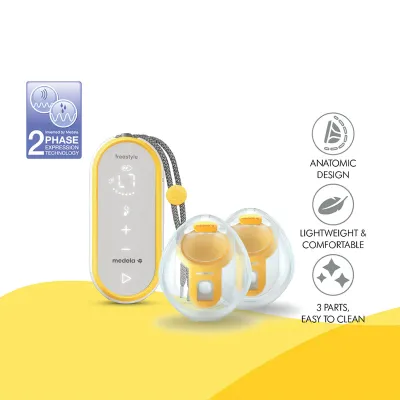
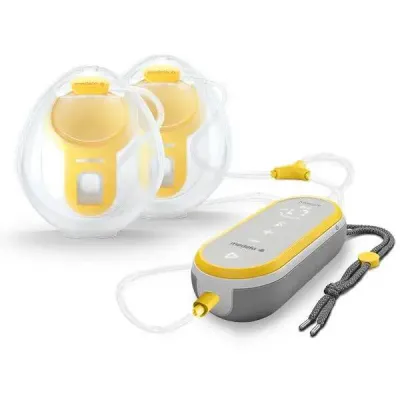
Prices are valid at publication and may change. Please refer to the product page for the latest price.
First, check the battery level of your pump’s motor unit. A critically low battery can cause the motor to run with reduced power, which directly impacts the vacuum strength. Connect your pump to its original charger and allow it to charge for at least twenty minutes before testing the suction again.
Next, confirm that all physical components are completely dry and correctly assembled. Even a tiny droplet of water inside the connectors or tubing can disrupt the vacuum seal or trigger safety sensors. If you have recently washed or sterilised your pump parts, ensure they have had sufficient time to air-dry completely.
Finally, perform a simple restart of both your breast pump and your smartphone. Power down the pump unit, wait ten seconds, and turn it back on. Simultaneously, restart your mobile device and toggle its Bluetooth setting off and on. This simple step clears temporary software glitches that often prevent successful pairing or cause minor motor lags.
How to Fix Medela Freestyle Suction Loss
A sudden or gradual loss of suction is one of the most common issues parents face with any breast pump. With the medela freestyle, the vacuum is created through a closed system of silicone membranes, plastic connectors, and tubing. If any part of this system is compromised, air will leak in, resulting in weak or non-existent suction.

Breast pump components are subject to natural wear and tear. Over time, frequent washing, sterilisation, and the physical stretching that occurs during milk expression will degrade the materials. If you notice a drop in suction that cannot be resolved by reassembling the parts, it is highly likely that one of your consumable parts needs to be replaced.
Inspect and Replace Wear Parts
The silicone membranes and valves inside your pump connectors are the most critical components for maintaining vacuum pressure. Begin by disassembling the connector units completely and inspecting the yellow or clear silicone membranes. Look closely for micro-tears, warping, stiffness, or small cracks along the edges.
Even a microscopic tear that is invisible at a casual glance can cause a complete loss of suction. Gently stretch the silicone to check for hidden damage, and ensure there is no dried milk residue buildup, which can prevent the membrane from sealing flat against the plastic housing. If you detect any signs of wear, deformation, or persistent residue, replace the membranes immediately with genuine manufacturer parts.
Check Tubing and Connections
The tubing delivers the air pressure from the motor unit to the breast shields. Inspect the entire length of the tubing for any visible kinks, bends, or punctures. Ensure that the plastic tubing adapter is pushed firmly and completely into the port on the motor unit, and that the opposite ends are securely attached to the breast shield connectors.
Moisture inside the tubing is a frequent culprit for suction loss. If you notice condensation or milk droplets inside the tubes, turn off the pump immediately. Disconnect the tubing, rinse it with clean water if milk has entered, and hang it vertically to air-dry completely before using it again. To prevent future moisture buildup, always let the pump run for a few minutes with only the tubing attached after you finish a session; this helps clear out any residual condensation.
Verify Flange Fit and Seal
Sometimes, what feels like a mechanical suction loss is actually a poor seal between the breast shield (flange) and your skin. If the flange is not sized correctly for your nipple, or if it is not positioned properly, air will leak into the system, reducing the effectiveness of the vacuum and potentially causing physical discomfort.
To ensure a proper seal, verify that your nipple is centered precisely within the tunnel of the breast shield before starting the pump. The flange should sit flush against your breast tissue without any gaps. If you have recently experienced changes in your body, or if you feel pinching or rubbing, you may need to reassess your flange size. Refer to the manufacturer’s sizing guidelines to determine if a larger or smaller breast shield is required for an optimal fit.
| Symptom | Possible Cause | Action to Take |
|---|---|---|
| Weak or no suction | Worn valve or membrane | Inspect for tears and replace if needed |
| Suction drops during use | Moisture in tubing or loose connection | Disconnect, dry tubing, and reattach securely |
| Pain or poor milk flow | Incorrect flange size or poor seal | Reassess flange fit and adjust positioning |
Resolving App Connection Issues
The medela freestyle features smart connectivity designed to help you track your pumping sessions, milk volume, and battery life through a dedicated smartphone app. However, software updates, operating system changes, or local wireless interference can sometimes disrupt this connection.
If your pump fails to connect to the app, remember that this does not affect the physical operation of the device. You can still fully control your expression sessions using the physical buttons and display on the pump’s motor unit. Your milk expression schedule does not need to wait for a software fix.
Check Bluetooth and App Permissions
To establish a reliable connection, your smartphone must be configured to allow the companion app to access your device’s hardware. Navigate to your phone’s main settings menu and verify that Bluetooth is turned on.
Next, locate the specific settings for the Medela app on your phone. Modern mobile operating systems require explicit permissions for Bluetooth pairing. Ensure that the app has been granted permission to access “Bluetooth,” “Nearby Devices,” and, on some Android devices, “Location Services.” Without these permissions enabled, the app will be unable to scan for or connect to your pump.
Unpair and Reconnect the Device
If the app previously paired with your pump but now refuses to connect, the existing Bluetooth bond may have become corrupted. You can resolve this by clearing the connection and starting fresh.
Open your smartphone’s Bluetooth settings and locate your pump under the list of paired devices. Select the option to “Forget” or “Unpair” the device. Next, open the Medela app, navigate to the device settings, and remove the pump from your profile if it is still listed. Restart both your phone and the pump, then open the app and follow the step-by-step on-screen instructions to pair the pump as if it were a brand-new device.
Update Software and Firmware
Software developers frequently release updates to fix bugs, improve stability, and maintain compatibility with new mobile operating systems. Check your device’s app store (Apple App Store or Google Play Store) to ensure you are running the latest version of the Medela app.
Additionally, the pump’s internal software, known as firmware, may occasionally require an update. If a firmware update is available, the app will typically prompt you to install it once a stable Bluetooth connection is established. Before initiating a firmware update, ensure your pump’s battery is fully charged and keep your phone close to the pump to prevent any connection drops during the installation process.
When to Contact Medela Customer Support
While most suction and connection issues can be resolved using the steps outlined above, certain symptoms indicate a deeper mechanical or electronic failure that requires professional attention. If you have replaced the wear parts, verified all connections, and performed a system reset but still experience issues, it is time to seek professional assistance.
Key indicators of a hardware issue include:
- Unusual noises: Grinding, clicking, or excessively loud sounds coming from the motor unit.
- Power failure: The pump motor failing to power on at all, even when connected to a known working charger.
- Error codes: Persistent error codes or flashing lights on the display screen that do not clear after a soft reset.
- Physical damage: Cracks on the motor casing from an accidental drop or signs of liquid ingress.
Do not attempt to open, unscrew, or repair the motor base yourself. Breast pump motor units are sealed systems; attempting to open the casing poses electrical safety risks, can introduce contaminants, and will immediately void your manufacturer’s warranty. If you suspect a motor failure, locate your original proof of purchase and contact the authorized local distributor or service center in Singapore. They can verify your warranty status and guide you through the repair or replacement process safely.
Preventive Maintenance for Reliable Performance
Establishing a consistent maintenance routine is the best way to prevent sudden suction drops and connectivity issues from disrupting your breastfeeding journey. By taking care of your equipment, you extend its lifespan and ensure safe, hygienic milk expression for your baby.
Always clean and dry all parts that come into contact with breast milk immediately after every use. Wash them in warm, soapy water, rinse thoroughly, and allow them to air-dry on a clean, dedicated surface. In Singapore’s humid climate, ensuring parts are completely dry before assembly is crucial to prevent the growth of mold and bacteria.
Store your pump’s motor base in a cool, dry, and temperature-stable environment away from direct sunlight. When packing your pump for travel or storage, avoid wrapping the silicone tubing tightly around the motor base or folding it sharply. Instead, coil the tubing loosely to prevent permanent kinks or structural weak points that could lead to air leaks in the future.

Community discussion
Share your experience or ask a question. Comments are reviewed before publication.